
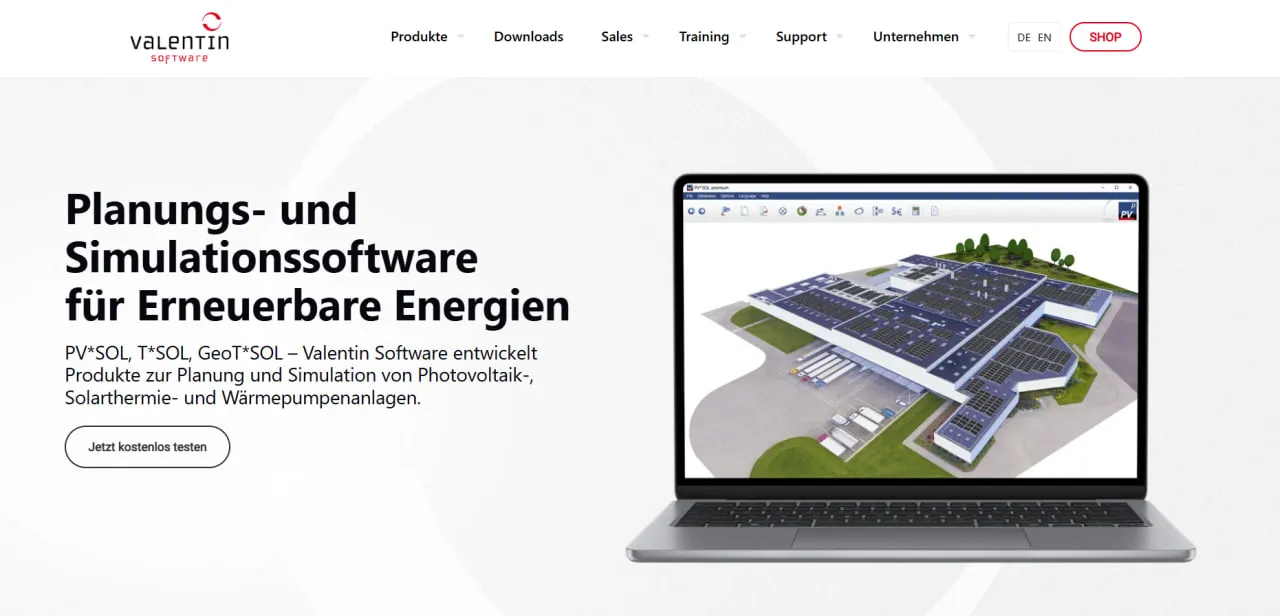
What Is Valentin Software?
The lineup has four desktop programs: PV*SOL premium (PV design with 3D visualization and 3D shading), PV*SOL (PV design in 2D and on photos), T*SOL (solar thermal) and GeoT*SOL (heat pumps), plus free online calculators for quick estimates. A PV*SOL project runs from site and climate data through module layout and component selection to a technical report and a financial forecast.
The simulation combines climate data for the site with the parameters of the chosen hardware, such as inverter efficiency curves and module ratings. Gerhard Valentin founded the company in 1988 as an engineering office; it released T*SOL in 1993 and PV*SOL in 1998. Its strongest market is Germany and the other German-speaking countries, and elsewhere it sells through partners in Europe, Asia, Africa and South America.
Valentin Software, based in Berlin, makes desktop software for planning PV, solar thermal and heat pump systems. Its programs estimate a system's energy yield, show how much of that energy the building will use itself, lay out PV modules in 2D or 3D and turn the result into a technical and financial report for the customer.
The flagship is PV*SOL, with T*SOL as its solar thermal counterpart. PV*SOL suits installers, EPCs, planners and energy consultants working on residential and C&I rooftops or small ground-mounted systems, especially where complex shading or a battery's effect on self-consumption decides the design. It is less suited to utility-scale plant engineering, where PVsyst is the usual tool, and like the rest of the lineup it runs only on Windows.
Pros and Cons
Pros
- One-minute steps catch the short load peaks and battery cycles that hourly averages smooth out, so self-consumption figures are more realistic.
- Manufacturers maintain their own data in the database, so datasheets rarely have to be typed in by hand.
- PV*SOL premium can build the 3D scene from Google Solar API data or, in Germany, Rexplorer building models instead of drawing it by hand.
- Licenses follow the user, not the PC, and three-month terms cover a busy season without a full-year commitment.
- Client-ready reports with your logo in 24 languages, useful for firms that sell in several countries.
- Heat pumps, electric vehicles and batteries are simulated together with the PV system.
- Mature and actively developed: PV*SOL dates from 1998 and still gets several releases a year.
Cons
- Steep learning curve for anyone new to energy simulation, especially in the 3D tools.
- Windows only (64-bit 10 or 11) with an online sign-in; 3D work needs a fairly powerful PC.
- Circuit diagrams are generated automatically, but construction-level electrical drawings for commercial EPCs often still require external CAD software.
- No perpetual licenses since 2024: staying current means paying every year or every three months, which may cost long-time users more.
- No CRM, lead management or quoting tools; design-and-sales platforms such as Aurora Solar cover that.
Features
- 3D Visualization and Shading Analysis (PV*SOL premium only): buildings and surrounding objects are modeled in 3D, and the program calculates the annual irradiation loss from their shadows for each module. The plain PV*SOL tier has 2D shading only.
Extensive Component Database
over 30,000 PV modules, 9,000 inverters and 16,000 battery systems, plus electric vehicles and power optimizers, with the data kept up to date by the manufacturers.
Dynamic Simulation
PV*SOL recommends one-minute steps, synthesizing minute irradiance values from hourly climate data with the Hofmann method, and offers one-hour steps for quick pre-sizing; T*SOL simulates in 1–6 minute steps.
Automatic Circuit Diagrams
the program draws the circuit diagram from the designed system, calculates string, DC and AC cable losses, and lets you add fuses, switch disconnectors and surge protection.
Climate Data Integration
TMY (Typical Meteorological Year) datasets for any location worldwide, picked from an interactive map.
Economic Efficiency Analysis
a 20-year analysis of cash flow, payback and return on investment from your system costs, electricity prices and the feed-in tariffs stored in the database; the 2027 version adds capacity tariffs, dynamic tariffs and peak shaving with batteries.
Off-Grid and Hybrid System Modeling
designs and sizes stand-alone systems and systems with battery backup or a backup generator.
Valentin Software Pricing
In November 2024, Valentin Software replaced perpetual, device-bound licenses with named user licenses rented for one year or three months. Perpetual licenses bought earlier still run, but their maintenance could not be renewed after October 1, 2024, so new versions require a subscription. List prices are in euros plus VAT. Besides the PV*SOL tiers below, T*SOL costs €485 per year or €165 for three months and GeoT*SOL €385 or €135; buying 2–4 licenses saves 5%, rising to 20% for 15 or more:
Free Trial: A 30-day free trial is available for PV*SOL premium, PV*SOL, T*SOL and GeoT*SOL, with all features except printing and saving the project report.
PV*SOL premium: €845 per year or €285 for three months. The only tier with 3D visualization, 3D shading and building data from Google Solar API and Rexplorer; it also includes every design mode of PV*SOL.
PV*SOL: €585 per year or €195 for three months. It plans in 2D and on photos, with 2D shading only and no 3D visualization.
Student License: €90 for a 180-day full version of PV*SOL premium, T*SOL or GeoT*SOL. It can be bought once per person, cannot be extended and is for non-commercial academic work only.
PV*SOL online: a free browser tool for quick yield estimates, without the design features of the desktop programs.
Maintenance and Updates: Every user license, whether for one year or three months, includes all program and database updates plus email and phone technical support during the license term.
Integrations
- Hardware Databases: Valentin offers the manufacturer-maintained PV*SOL online database to third-party software through a REST API.
- Meteorological Tools: Meteonorm 9 (2001–2020 data) for any location worldwide and DWD-based TMY data for every km² of Germany. PV*SOL premium adds PVGIS, Solcast and SolarAnywhere as providers, and your own measured data can be imported in DWD, Meteonorm or WBV format.
- CAD Support: PV*SOL premium imports 3D models as object data; floor plans, cadastral maps and map screenshots can also be traced and extruded into buildings.
- Mapping Services: in PV*SOL premium, the Google Solar API supplies orthophotos and elevation data, and Rexplorer supplies 3D building models from LiDAR scans for sites in Germany.
- Planning Tools: Interfaces to the mounting-system planners K2 Base (K2 Systems) and PV-Configurator (Renusol), so systems do not have to be planned twice.
How to Set Up Valentin Software
- Download the trial or licensed version from the Valentin Software website.
- Install the software on a 64-bit Windows 10 or 11 PC with an internet connection, which is needed to sign in (check the system requirements before using 3D features).
- Register through the invitation email sent after purchase and sign in to the program with that user account.
- Configure regional settings, including preferred units of measurement and default currency.
- Update the product database to get the latest module and inverter data.
- Select your first project location to download its climate data.
How to Use Valentin Software
A project starts with the location, its climate data set and the system type: grid-connected, off-grid or with battery backup. Modules then go on the roof or ground area, either in 2D and on site photos or, in PV*SOL premium, in a 3D model of the building and its surroundings; the obstructions entered here drive the shading calculation.
With the layout fixed, the software suggests compatible inverters and string configurations. A load profile (the building's consumption pattern) then shows how much solar energy is used on site and how much is exported. The last step is the simulation itself, followed by the project report with technical data, yield charts and the economic analysis.
What You Can Produce with Valentin Software
- Detailed Energy Yield Reports: expected annual and monthly energy production, exported to Word or PDF.
- 3D Shading Maps (PV*SOL premium): how shadows move across the PV array through the day and the year.
- Financial Feasibility Studies: Analyses of ROI, payback periods, and net present value based on local incentives.
- Technical Circuit Diagrams: the system schematic with cabling and protection devices, included in the project report.
- Self-Consumption Simulations: Visualizations of energy flow between PV, battery storage, and local loads.
- Project Proposals: a customer presentation for quotes and sales meetings that pairs the key technical figures with 3D views.
FAQs
What does Valentin Software do?
Valentin Software makes desktop programs for planning energy systems: PV*SOL and PV*SOL premium for photovoltaics, T*SOL for solar thermal and GeoT*SOL for heat pumps. The PV programs predict energy yield, lay out modules in 2D or (in premium) 3D and calculate the financial return.
Who is Valentin Software best for?
PV installers, EPCs, planners and energy consultants working on residential and C&I rooftops or small ground-mounted systems who need a yield and financial report the customer can follow. It is most useful where shading is complex or a battery's effect on self-consumption has to be simulated. For utility-scale plants, PVsyst is the more common tool.
Is Valentin Software free?
Valentin Software offers free online calculators (PV*SOL online, T*SOL online and GeoT*SOL online) for basic calculations, and a 30-day free trial of its professional desktop versions. However, printing or saving the project report requires a paid named user license, sold for one year or three months.
What are the main limitations of Valentin Software?
The 3D tools take time to learn. Circuit diagrams are generated automatically but do not replace construction-level electrical drawings, so users may still need AutoCAD for those. 3D planning in PV*SOL premium is capped at 15,000 roof-mounted or 10,000 ground-mounted modules; plain PV*SOL takes solar parks of up to 100,000 modules, but only in 2D. The programs run only on 64-bit Windows 10 and 11 and need an internet connection to sign in, so Mac and Linux users cannot run them natively.
What are the best alternatives to Valentin Software?
Common alternatives for solar design and simulation are PVsyst for detailed technical analysis, including utility-scale plants; Aurora Solar for combined sales and design; and HelioScope, owned by Aurora Solar since 2021, for fast 2D and 3D layout of commercial-scale systems.


