
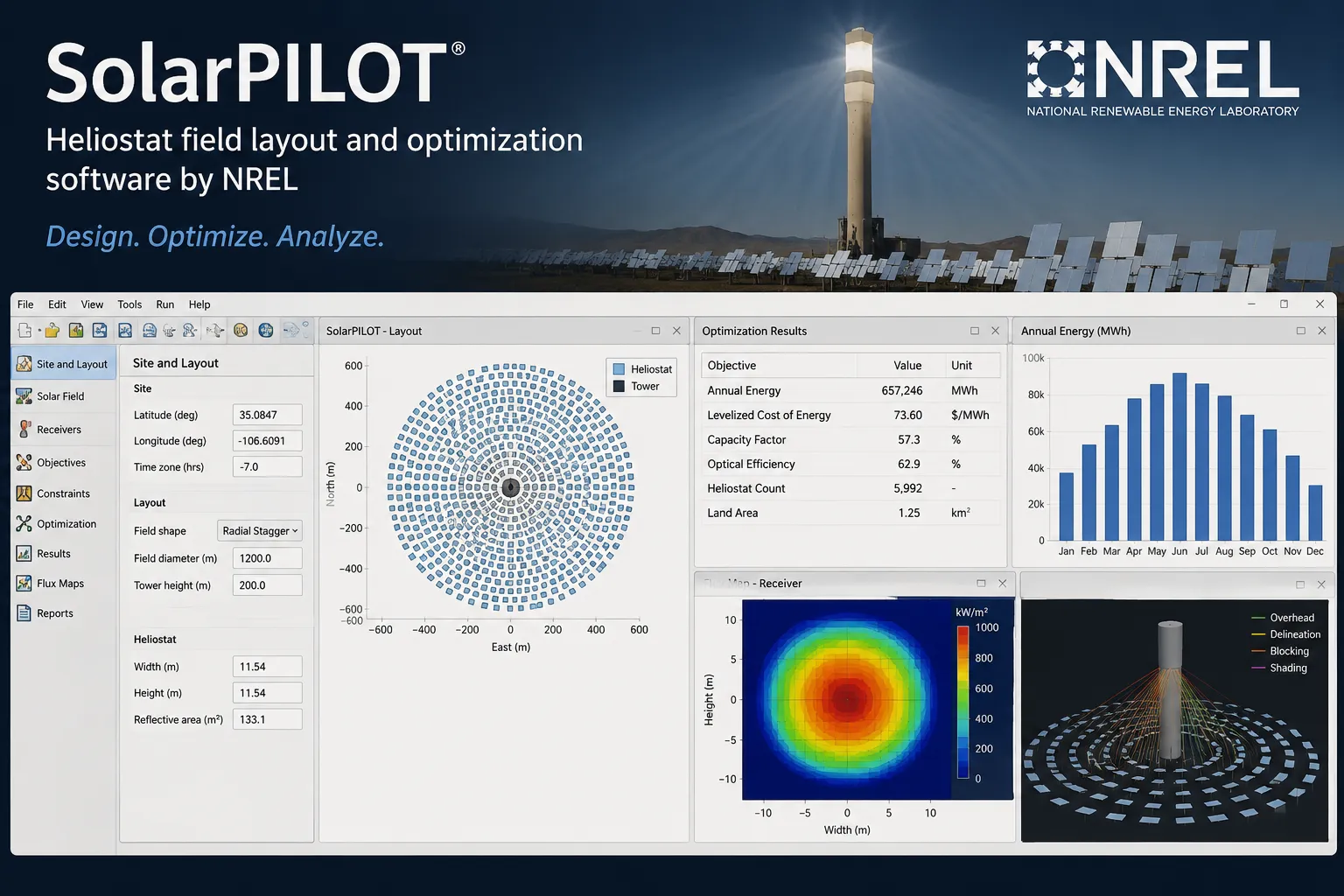
What Is SolarPILOT?
SolarPILOT was developed by the National Renewable Energy Laboratory (NREL), which the U.S. Department of Energy renamed the National Laboratory of the Rockies (NLR) in December 2025. It models a single type of CSP plant: the power tower, or central receiver, system.
Two engines model the light path from the sun to the heliostats (tracking mirrors) and on to the receiver. The fast analytical engine extends the Hermite expansion method of Sandia National Laboratories’ DELSOL3 but calculates a flux image for each heliostat rather than for groups of them; in the published verification case it laid out 8,945 heliostats against DELSOL3’s 8,947. For complex geometries or a cross-check, the same model runs through NLR’s SolTrace Monte Carlo ray tracer.
The code is open source on GitHub and was developed with U.S. Department of Energy funding, so anyone can inspect how a result is calculated. The full program is a standalone desktop application for Windows and Linux; NLR’s System Advisor Model (SAM) includes SolarPILOT only in limited form inside its power tower models.
SolarPILOT (Solar Power tower Integrated Layout and Optimization Tool) designs the solar field of a concentrating solar power (CSP) tower plant. It places thousands of heliostats around the tower, sizes the tower and receiver, calculates each heliostat’s optical losses and maps the flux that reaches the receiver.
Its main users are researchers, technology developers and universities, who compare heliostat and receiver concepts, screen potential sites and check privately developed tools against an independent reference. It does not model PV, parabolic trough or linear Fresnel plants, and it stops at the receiver: annual production, the power block, thermal storage and financials need other tools.
Pros and Cons
Pros
- High computational efficiency: the analytical Hermite engine models fields of thousands of individual heliostats quickly enough for iterative layout optimization.
- Free for commercial use and modification under a BSD-style license, so it can go into paid projects and in-house tools.
- Built-in SolTrace lets you check a layout found with the fast analytical method without rebuilding the model in another program.
- Handles irregular land boundaries, mixed heliostat designs and plants with more than one receiver in a single model.
- Its peer-reviewed method (Solar Energy, 2018) was verified against Sandia’s DELSOL3, so it is a credible reference for checking other tools.
- LK and Python (CoPylot) scripting lets you run batch studies and couple SolarPILOT to your own models without the GUI.
Cons
- Steep learning curve: it assumes working knowledge of CSP optics, and the engineering-style interface is harder going than commercial design tools.
- No macOS installer, and Python automation is tested only on Windows: CoPylot ships with a Windows DLL, and its Linux and macOS loading code is marked as never tested.
- Power tower plants only, and it stops at the receiver: annual production, power block, thermal storage and financial modeling need a separate tool such as SAM.
- Slow development: the official NLR download is still version 1.1 from 2018, and later versions up to 1.5.2 (2022) exist only as GitHub source tags without installers.
- No commercial support or guaranteed response times: beyond the Help system and GitHub issues, the only channel is an NLR inbox with limited resources.
Features
Heliostat Field Layout Generation
Builds the field around the tower from the site’s solar and atmospheric conditions, receiver geometry, tower height and market pricing factors.
Optical Performance Characterization
Calculates how much of each heliostat’s reflected sunlight reaches the receiver after shading, blocking and other optical losses.
Customizable Land Boundaries
Imports irregular site outlines from KML files, so heliostats are placed only on usable land.
Analytical and Ray-Tracing Engines
Fast analytical runs for design iterations, SolTrace ray tracing for complex geometries; after a 2018 speedup, NLR ray-traced its default 500 MWt case in 6.7 s instead of 11,672 s.
Smart Aiming Algorithms
Assigns each heliostat an aim point to spread flux across the receiver and avoid hot spots that can damage it.
Parametric Analysis
Runs a series of simulations that vary one input, such as heliostat size or tower height, to show its effect on system cost.
Multi-Threaded Execution
Spreads simulations across CPU cores, which shortens run times on fields with thousands of heliostats.
API and Python Support
The built-in LK scripting language and the CoPylot Python API automate runs and connect SolarPILOT to other models.
SolarPILOT Pricing
SolarPILOT is open-source software provided by the National Laboratory of the Rockies (NLR, formerly NREL).
Free Availability: The software is free to download, use and modify, including for commercial work, under a BSD-style license from the Alliance for Sustainable Energy.
Source Code Access: The C++ source code is publicly available on GitHub, allowing organizations to audit the algorithms or contribute new features.
License Conditions: Research entities such as universities and national laboratories that redistribute it must publish the source, and modified versions may not be called SolarPILOT.
Support: While the software is free, technical support is limited to the built-in Help system, GitHub issues and an NLR support email address, for which the lab says resources are limited.
Integrations
SolarPILOT connects directly only to NLR’s own tools and to Python; other software exchanges data with it through files.
Modeling and Simulation Integrations
- System Advisor Model (SAM): SAM calls SolarPILOT through its API to lay out the solar field for its power tower models and handles annual performance and financials itself.
- SolTrace: The ray-tracing engine runs inside SolarPILOT, and a field can also be exported as a SolTrace .stinput file for work in standalone SolTrace.
- CoPylot (Python API): Python scripts can set inputs, generate layouts, run simulations, pull heliostat results into pandas DataFrames and read receiver flux maps.
Data and File Formats
- Google Earth (KML): Supports KML files for defining land boundaries and site locations.
- CSV/Text: Exports each heliostat’s position, aim point, efficiencies and power as tab-, comma-, semicolon- or space-delimited text; heliostat positions can also be imported.
How to Set Up SolarPILOT
- Download the Windows or Linux installer from the official SolarPILOT download page on the NLR website (a short registration form is required), or get the source code from GitHub and build it yourself.
- Run the installation wizard and agree to the open-source license terms.
- Launch the application and select “New Project” (Ctrl+N), which loads the default inputs.
- Define your site on the “Climate” page by selecting a weather data file; SolarPILOT reads the latitude and longitude from it.
- Specify the heliostat geometry, tower height and receiver dimensions on the Layout Setup, Heliostats and Receivers pages.
- Run “Field Layout” (F5) to generate the solar field from your inputs.
How to Use SolarPILOT
Inputs are spread over six pages: Climate, Markets, Costs, Layout Setup, Heliostats and Receivers. Each calculation is started from the Run menu or with a function key.
The layout run places heliostats to limit shadowing and blocking. Check the result in the interactive field plot on the Layout Results page, which shows whether the field fits inside the land boundary.
Performance Simulation (F6) calculates receiver flux for any specified time or sun position and maps it on the Receiver Flux Profile page. If peak flux is too high, change the aiming strategy and rerun. A parametric simulation (F7) shows how one design variable, such as mirror reflectivity or tower height, affects field performance; Optimization (F8) varies several at once.
What You Can Manage with SolarPILOT
- Heliostat Field Layouts: Position, orientation and aim point of every heliostat, for fields of thousands of mirrors.
- Receiver Flux Profiles: Flux maps of the receiver surface, used to keep peak flux within what the receiver can handle.
- Land Boundaries: Site outlines and exclusion zones that limit where heliostats can go.
- Optical Performance Data: Cosine, shadowing, blocking, atmospheric attenuation and intercept efficiency for each heliostat and for the whole field.
- Design Optimization: Balances tower height, receiver size and heliostat count with the COBYLA algorithm to minimize plant cost per unit of annual energy within a peak receiver flux limit.
- Simulation Scripts: LK or Python scripts that set up and run many cases in one batch.
FAQs
What does SolarPILOT do?
SolarPILOT designs the solar field of concentrating solar power tower plants: heliostat layout, tower and receiver sizing, optical efficiency and receiver flux. It uses a fast analytical method for design iterations and SolTrace ray tracing for detailed checks.
Who is SolarPILOT best for?
It suits CSP researchers, students and power tower solar field engineers who need detailed optical modeling, and technology developers who want an independent check on their proprietary tools. It is not meant for PV, parabolic trough or linear Fresnel projects.
Is SolarPILOT free?
Yes, SolarPILOT is free and open-source software developed by NREL (now the National Laboratory of the Rockies) with U.S. Department of Energy funding. Both the compiled desktop application and the original source code are available at no cost.
What are the main limitations of SolarPILOT?
It covers only the “front end” of a power tower plant: the solar field and receiver. It does not simulate the steam turbine or thermal energy storage, is not meant for annual production analysis, and does no financial modeling beyond the solar field cost and cost-of-energy estimates used in optimization. NLR’s SAM, which runs a limited version of SolarPILOT in its power tower models, handles those parts.
What are the best alternatives to SolarPILOT?
Alternatives include the open-source Tonatiuh, NLR’s standalone SolTrace and proprietary software developed by CSP technology providers. For whole-plant performance and financial analysis, NLR’s System Advisor Model (SAM) is the usual companion.


