
What is Solargraf?
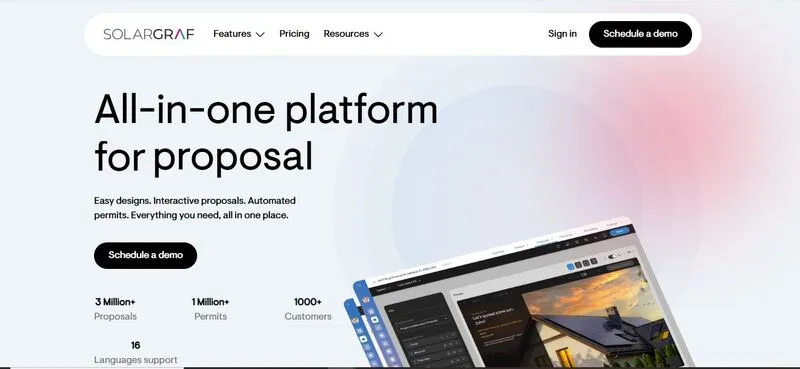
Solargraf is a cloud-based solar proposal platform from Enphase Energy, which bought its Montreal-based developer Sofdesk in January 2021. It is used by installers, EPC teams, and sales organizations, and it designs with panels, inverters and batteries from any manufacturer, not only Enphase. It connects rooftop system design, financial calculation, proposal delivery and permit plan sets in one place.
Most users are residential installers and their sales teams. A 2026 update raised the design limit from 500 kW DC to 2 MW DC, so it now also covers C&I projects. It is not meant for utility-scale plants, detailed engineering or teams that need a full CRM, and automatic utility-rate data covers US projects only.
Solar deals tend to stall after the site visit, while someone draws the layout, checks the numbers and formats the proposal. Solargraf keeps those steps in one tool, so a sales rep can go from a site address to a priced proposal with financing that the customer signs online.
Pros and Cons
Pros
- Templates and company branding keep proposals consistent across a sales team, with no manual formatting
- Low training requirement for new sales reps
- Designs with any brand of panels, inverters and batteries, not only Enphase hardware
- Integrated lenders let reps quote monthly payments and start a financing application from the proposal, without switching to a lender portal
- Digital signing removes follow-up delays
- Permit plan set orders are pre-filled from the signed project, so nothing is re-entered
Cons
- Not a CAD or detailed engineering tool, and PE stamps are a separate paid service
- Designs are capped at 2 MW DC, so utility-scale projects need another tool
- The built-in CRM is a basic leads list, and connecting Salesforce or Zoho needs the $4,000-a-year API add-on on all plans below Enterprise
- Automatic tariff data covers US projects only, and C&I demand charges and taxes must be entered by hand
- No free plan; the entry plan costs $2,799 a year, billed annually
Features
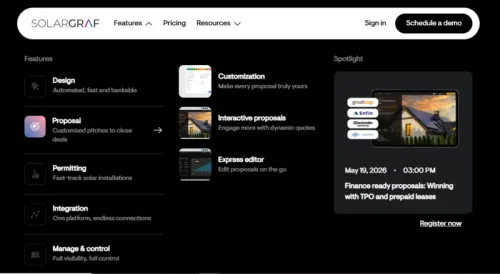
Besides the sales features below, Solargraf produces permit packages in PDF and DWG, with single-line diagrams for solar plus storage and a database of more than 20,000 AHJs.
Satellite-based layout design
Roof surfaces are mapped on aerial or satellite imagery from Nearmap, Google Maps or Bing Maps (or an uploaded drone image or blueprint), and LiDAR-based 3D modeling detects roof pitch, azimuth and obstructions automatically. Panels can be placed by hand or in one click against a consumption-offset, bill-offset or maximum-fit goal, with setbacks and fire pathways applied automatically. There is no CAD drafting involved.
Automated proposal generation
Once a design is in place, the platform turns it into a proposal with system size, estimated generation, savings and a price breakdown. Templates carry the company logo, colors and fonts, and several design options can be compared side by side in one proposal.
Financing embedded in proposals
Next to the cash price, proposals can show monthly payments for loans, leases, prepaid leases and PPAs, including financing products the installer sets up itself. This matters in residential sales, where the upfront cost is often the main objection.
Energy and savings estimates
The system calculates expected output from weather data and an hourly shading simulation for each roof surface. The US National Laboratory of the Rockies (formerly NREL) tested the production engine against measured data from three PV systems and found results comparable to its own System Advisor Model (SAM). Utility rates are applied to translate generation into cost savings. These figures are meant for proposal discussions, not final engineering approval.
Client-facing proposal layout
Customers open the proposal as an interactive web page on phone, tablet or desktop, or as a PDF, with charts for payments, savings and projected return. Reps can hide or reorder sections and, in the Express Editor, change the system, price or financing during the conversation.
Digital sending and e-signature
Proposals are sent from the platform, and customers review and sign them with the built-in e-signature, so there is no paper contract to chase.
Pipeline tracking (basic)
A leads page collects prospects entered by hand, imported from CSV, or sent through the API or a website lead-capture form added in 2026. Each lead has a status, and a quote is started straight from it. It is not a full CRM, but it shows which opportunities are active.
Utility rate integration
Savings estimates use local tariff data, which matters most where prices change with consumption or time of use. Automatic tariff and usage data from Genability is available only for projects in the United States. On commercial projects, demand charges and taxes are entered by hand.
Solargraf Pricing
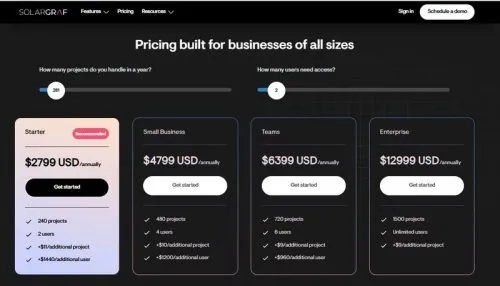
Solargraf publishes four annual plans in US dollars, and every plan includes the same core features (design, shading, proposals, permitting, financing and CRM):
Starter: $2,799 USD/annually (240 projects, 2 users)
Small Business: $4,799 USD/annually (480 projects, 4 users)
Teams: $6,399 USD/annually (720 projects, 6 users)
Enterprise: $12,999 USD/annually (1,500 projects, unlimited users, public API included)
Beyond the allowance, an extra project costs $9 to $11 and an extra user $960 to $1,440, depending on the plan. Public API access is a $4,000-per-year add-on on every plan except Enterprise. There is no free plan, and all plans are billed annually.
Integrations
- Financing: EnFin, GoodLeap and LightReach are fully integrated, EverBright and IGS accept Solargraf proposals, and Sunstone Credit offers loans for C&I projects
- Genability for utility tariff and usage data
- DocuSign, with contract templates, signing status and a time-stamped signing history
- CRMs such as Salesforce or Zoho, connected through the paid public API
Designs can also be exported to Enphase Enlighten, with production and consumption data imported back for expansion and battery proposals. Solargraf does not try to replace a CRM or ERP; it passes project data to them through the API.
How to Use Solargraf
Set up account
Create the company profile and add branding: logo, contact details and default proposal settings.
Create a project
Enter the site address. Satellite imagery loads automatically.
Build system layout
Confirm the roof sections, place panels and size the system to the customer’s consumption.
Review output data
Check energy production estimates and savings projections before proceeding.
Configure pricing and financing
Set margins, system cost, and available financing options.
Generate proposal
Solargraf compiles the design, production, pricing and financing into the branded proposal.
Send and close
Send the proposal from the platform; the customer reviews and signs it online.
FAQs
Is Solargraf an engineering tool?
Not a full one. It produces permit plan sets itself, and Solargraf’s paid permit service can prepare them with PE stamps; residential sets are usually ready in 24 to 48 business hours. It is not a CAD tool for detailed engineering.
Who uses it most?
Mostly residential installers and their sales teams, plus EPCs and installers selling C&I projects.
Can it handle complex projects?
Up to a point. It handles residential and commercial rooftops, flat roofs with parapets and ground-mounted arrays, with designs up to 2 MW DC, but it is not built for utility-scale projects.
Does it replace CRM software?
No. It has a basic leads list; a CRM such as Salesforce or Zoho can be connected through the paid public API.
How accurate are the financial outputs?
Good enough for sales proposals, but not for financial audits or engineering sign-off.
What is the main value of Solargraf?
It shortens the time from site address to signed proposal by keeping design, pricing, financing and signature in one tool.


