
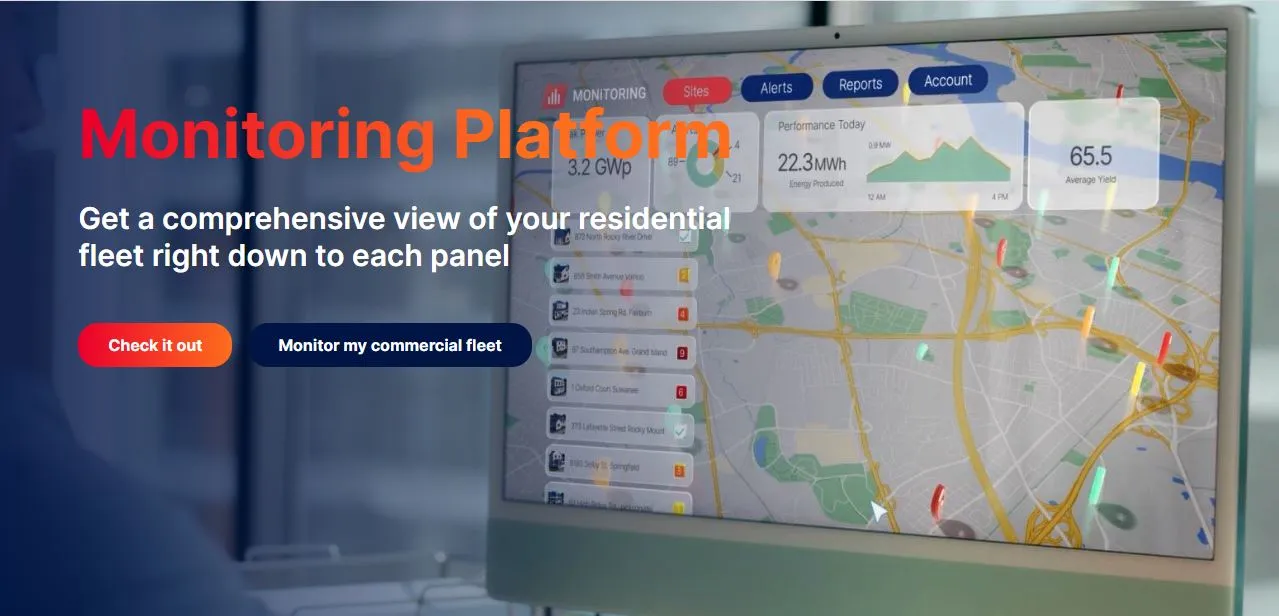
What Is the SolarEdge Monitoring Platform?
The SolarEdge Monitoring Platform is a cloud-based monitoring and management system tied exclusively to SolarEdge inverter systems. Each SolarEdge power optimizer collects panel-level performance data and routes it through the inverter to SolarEdge’s cloud, where both homeowners and installers can access it.
SolarEdge does not watch the sites itself. The installer is the portal administrator, sets up the alerts, and chooses how much the owner sees: Dashboard, Dashboard and Layout, or Full Access. Owners then log in through the mySolarEdge app or the web portal, while installers manage their fleet in the portal and, on mobile, in the separate SolarEdge GO app.
The SolarEdge Monitoring Platform is the free web portal and mySolarEdge app that come with a SolarEdge inverter system. Its strength is panel-level data: one underperforming module shows up on its own instead of hiding in the system total. It is built for homeowners and residential installers running SolarEdge hardware. It is not for mixed-brand fleets, since it reads only SolarEdge equipment, nor for commercial sites, which SolarEdge now monitors on its separate ONE for C&I platform.
Pros and Cons
Pros
- No subscription for owners or installers, so on Wi-Fi or Ethernet sites monitoring adds no running cost
- Module-level alerts tell the installer which panel is at fault before anyone goes on site, so a service visit starts with a known target
- Weather Guard fills the backup battery before a storm and restores the usual reserve afterward, with no manual changes
- Owner self-service troubleshooting on SetApp-enabled inverters cuts down on unnecessary installer visits
- Owners can check the system from a browser, iPhone, iPad, Apple-silicon Mac, Android phone, or Wear OS watch
- One installer login covers the whole residential fleet, with no per-site fee and no switching between customer accounts
Cons
- Reads only SolarEdge inverter systems, so mixed-brand fleets need a second tool, and commercial sites have moved to the separate ONE for C&I platform
- Energy consumption monitoring requires a separately installed consumption meter
- Some App Store reviewers report push notifications arriving late
- In-app troubleshooting and network configuration work only on SetApp-enabled inverters, and only with the phone at the inverter
Features
- Live production and consumption data, with history over any date range
- Module- and inverter-level performance data, with a PV layout view that maps each panel’s output
- Live energy-flow diagram showing power moving between solar, battery, grid, and household loads
- Weather Guard, which charges the backup battery to full when the U.S. National Weather Service issues a severe weather alert
- On SetApp-enabled inverters, the app connects directly to the inverter on site for status checks, step-by-step troubleshooting, a server-communication test, and communication and network settings
- Smart home device control and SolarEdge EV charger management from within the app
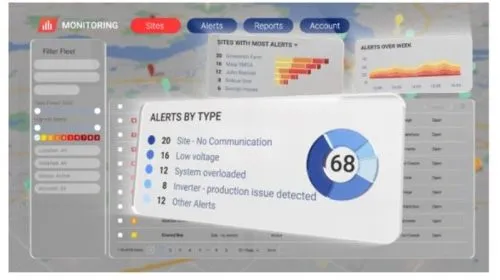
- Installer dashboard for monitoring all residential installations from one view, with module-level automated alerts
- Wear OS app for monitoring and site control on watches such as the Pixel Watch (there is no Apple Watch app)
SolarEdge Monitoring Platform Pricing
The mySolarEdge app and web monitoring portal are free for all SolarEdge system owners, with no subscription or monthly fee; the only requirement is the account your installer creates during commissioning. Installer accounts are free too, with no per-site charge. The cost to check is connectivity: sites without Wi-Fi or Ethernet use a cellular plug-in, and SolarEdge’s U.S. residential cellular plug-in was sold with a prepaid 5- or 12-year data plan that cannot be extended.
Integrations
The platform is built around SolarEdge’s own hardware: power optimizers, inverters, SolarEdge Home Batteries, and EV chargers all report into the same monitoring view, with no separate apps or manual data entry.
Third-party software connects through the Monitoring API: a site API key generated in the portal’s admin section lets tools such as Home Assistant pull the site’s data. The inverter reaches the SolarEdge cloud over Wi-Fi, Ethernet, or cellular, depending on what is available at the site.
How to Set Up the SolarEdge Monitoring Platform
Most of the setup is the installer’s job during commissioning. The owner’s part is short:
- Your installer registers the system and creates your monitoring account during commissioning
- An activation email arrives from SolarEdge — check the spam folder if it doesn’t show up in your inbox
- Click the confirmation link and create your account password
- Download the mySolarEdge app from the App Store (iOS 15.0 or later) or Google Play (Android 7.0 or later)
- Log in and start reviewing your system’s production and energy flow straight away
How to Use the SolarEdge Monitoring Platform
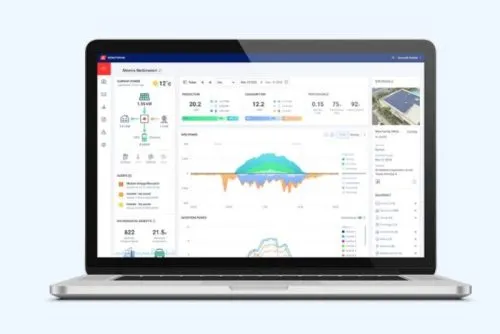
- Open the app or web portal to check live production; the energy-flow diagram shows where power is coming from and where it is going.
- Pull up the PV layout view (if your installer has granted layout access) to spot any panel that has dropped below the expected output.
- If data stops appearing and the inverter is SetApp-enabled, go to the inverter, scan its QR code in the app, briefly move the red ON/OFF/P switch to P, and run the server-communication test.
- If you have battery backup, turn on Weather Guard on the app’s Storage screen; a push notification tells you when it starts pre-storm charging.
- Adjust EV charging from the app and choose whether the home battery helps charge the car or stays in reserve (this needs inverter firmware 4.23.36 or later).
- Review production and consumption history over any period; on sites with configured utility rates and meters, the My Savings tab shows what the system has saved.
- When selling the home, show buyers the system’s actual production history rather than projected estimates.
- As an installer, review module-level alerts across your customer sites before a service visit, so you arrive knowing which panel or inverter needs attention.
- Use the alert history to document a site’s service record for warranty or insurance claims, and export site data for your own reports.
FAQs
Is the SolarEdge Monitoring Platform free to use?
Yes. The mySolarEdge app and web portal are free for all SolarEdge system owners, with no subscription fee for standard monitoring features.
Does the platform work without a consumption meter?
Production monitoring works without one. Household consumption figures and the My Savings tab need a SolarEdge consumption meter installed with the system.
What is Weather Guard, and which systems support it?
Weather Guard is a mySolarEdge setting that tries to charge the home battery to full, from solar and/or the grid, when the U.S. National Weather Service issues a severe weather alert for the area; charging begins within 48 hours of the alert. When the event ends, the battery returns to its previous backup reserve (for example, 30% → 100% → 30%). Because it relies on NWS alerts, it is a feature for US homes, and it works only on SolarEdge systems with a SolarEdge Home Battery or a compatible LG Chem battery.
Can installers monitor multiple customer sites from one account?
Yes. The installer dashboard shows all of an installer’s residential sites in one view, with module-level alerts and remote diagnostics for each, so there is no switching between individual accounts.


