
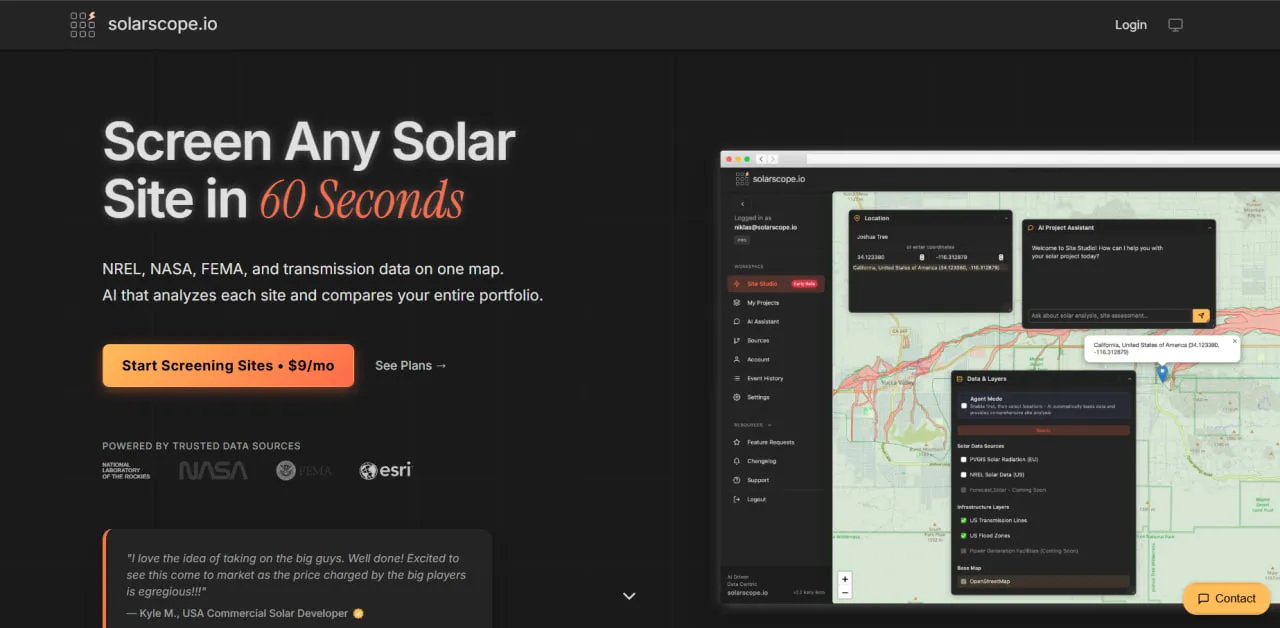
What Is Site Studio?
Site Studio is a web-based site screening tool for early-stage solar development. It covers community, commercial and industrial (C&I) and utility-scale projects in the United States, while solar resource data is available worldwide.
It does not draw module layouts or produce bankable yield reports. Its job is the go / no-go decision: is this parcel close enough to transmission, outside high-risk flood zones and good enough on irradiance to justify detailed design in tools such as PVsyst or HelioScope. The vendor itself describes SolarScope as a screening tool, not a replacement for a utility capacity check or a site survey.
Most solar sites fail for boring reasons: the nearest high-voltage line is too far away, part of the parcel sits in a flood zone, or the land is protected. Finding that out after paying for layout work and studies is expensive. Site Studio is built for the step before design, when a developer has a list of addresses and needs to know which ones deserve real money.
Site Studio is the map workspace of SolarScope, a screening tool from Lissjos Engineering in Encinitas, California. Pick a site and the solar, grid and flood data load on their own. An AI analyst then gives a short verdict and flags deal-breakers.
Pros and Cons
Pros
- Site data loads automatically, without hunting for map layers or building spreadsheets.
- The AI verdict cites the loaded values, which makes it easy to check.
- Low, predictable pricing with unlimited screenings.
- Self-serve trial with no credit card or sales call.
- Works from AI assistants and code through an MCP server and API.
Cons
- Grid, flood and land checks cover the United States only.
- A screening result is not a substitute for utility capacity checks or a survey.
- No layout design, yield simulation or CRM integration.
- A young product from a small company, with support handled mainly by email.
Features
Automatic site data
Search an address, paste coordinates or click the map, and irradiance, transmission lines by voltage and FEMA flood zones load without picking layers by hand.
Land and grid checks
Wetlands, protected land, slope, farmland, substations, interconnection queue data and the serving utility are checked for each site.
AI first read
Every site gets a plain-English summary and a verdict such as “Pursue”, based on the loaded values rather than guesses from a city name.
AI Portfolio Insights
Saved sites can be ranked by solar resource and grid access in one conversation to decide which site to pursue first.
PDF site reports
Reports carry your logo; the Portfolio plan adds a portfolio report that ranks all sites and saved report templates.
AI agents and API
An MCP server and REST API let ChatGPT, Claude, Cursor, Codex, GitHub Copilot or Windsurf screen sites, save them to projects and create reports.
Site Studio Pricing
SolarScope has two plans, both with unlimited site screenings and no per-project fees:
Pro, $49 per month
All data layers, AI site analysis, AI Portfolio Insights, PDF reports with your logo, and agent/API access with 50 screenings and 10 reports a month.
Portfolio, $149 per month
Everything in Pro, four times the AI allowance, portfolio and own-brand reports, 500 API screenings and 50 reports a month, and priority support.
Yearly billing gives two months free. The 14-day trial includes everything, needs no credit card and does not convert to a paid plan automatically.
Integrations
Site Studio connects to AI tools rather than to CRM or CAD software. ChatGPT and Claude connect by signing in, while Cursor, Codex, GitHub Copilot and Windsurf use the MCP server. Developers can call the REST API from their own code.
Data comes from public sources: NREL and the EU’s PVGIS for irradiance, FEMA’s National Flood Hazard Layer, HIFLD for transmission lines of 100 kV and above, and USFWS, PAD-US, USGS, USDA, OpenStreetMap and Berkeley Lab for wetlands, protected land, slope, farmland, substations and grid queues.
How to Set Up Site Studio
- Start the free 14-day trial on solarscope.io; no credit card or sales call is needed.
- Create a project for the region or pipeline you want to screen.
- Optionally connect your AI assistant or code editor through the MCP server.
- Upload your logo if you plan to share PDF site reports.
- Choose Pro or Portfolio before the trial ends to keep working with your saved sites.
How to Use Site Studio
Work starts on the map. You enter an address, paste coordinates or click a location, and Site Studio loads the solar resource, the distance to the nearest transmission line and its voltage, and the flood zone status. Within a minute you see a site summary, a verdict and a short first take from the AI.
From there you can ask follow-up questions in plain English, for example how far the parcel is from a 138 kV line or whether a high-risk flood zone is nearby. Sites worth keeping go into a project. Once a pipeline has several candidates, Portfolio Insights ranks them so the team knows where to spend money on interconnection checks, surveys and detailed design.
What You Can Manage with Site Studio
- Site pipelines: Saved candidate sites grouped into projects.
- Screening results: Irradiance, grid distance, flood status and land constraints for each site.
- Site rankings: AI-ranked lists that show which sites to pursue first.
- Reports: Branded PDF reports for single sites and, on the Portfolio plan, whole portfolios.
FAQs
What does Site Studio do?
Site Studio is a solar site selection tool that loads irradiance, transmission, flood and land data for a US site and gives an AI verdict on whether it is worth pursuing.
Who is Site Studio best for?
It suits solar developers, land teams and analysts who screen many community, C&I or utility-scale sites before committing to design and studies.
Is Site Studio free?
No, but there is a 14-day free trial with all features and no credit card. Paid plans start at $49 per month.
What are the main limitations of Site Studio?
Grid and flood screening covers the United States only, and the results are a first read, not a bankable study: line capacity still has to be confirmed with the utility and flood status with a survey. It also does not design module layouts.
What are the best alternatives to Site Studio?
Alternatives include PVcase Prospect, Glint Solar, Paces, Solargis Prospect and ArcGIS.


