
What Is Pylon Solar?
Pylon is a cloud-based solar design, proposal and CRM platform, founded in 2016 by solar engineer Nelson Zheng and software developer Daniel Buckmaster. It covers the sales side of a job: roof layout, shading, battery and load modeling, the single-line diagram, a proposal the customer can sign and pay by card, and job sheets for the install crew.
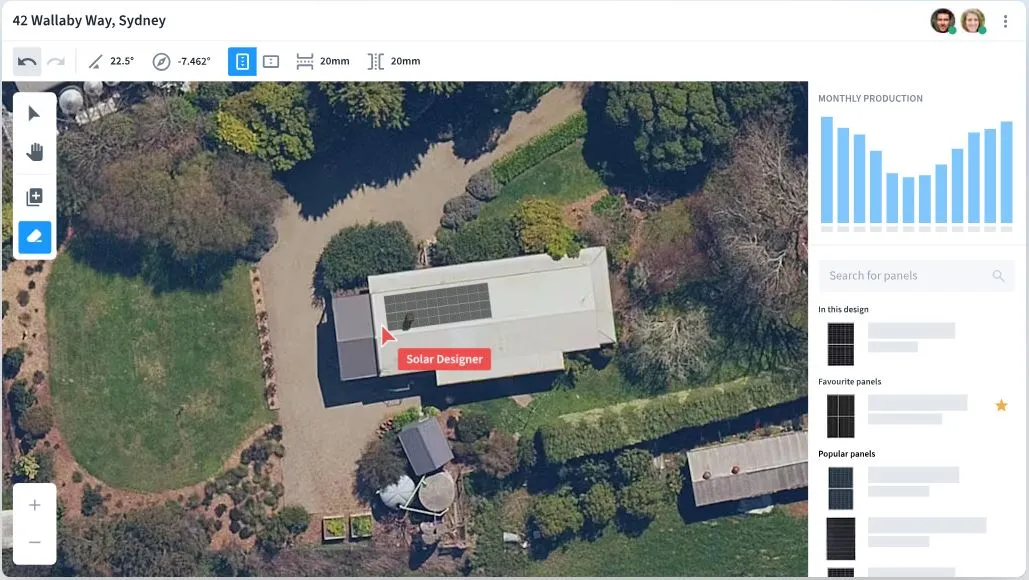
Pylon says more than 3,500 solar businesses use it. Australia is its home market, with localized versions for the UK, Ireland, New Zealand and the Netherlands. It works on desktop and iPad, and designers place panels on a flat 2D aerial image instead of rotating a 3D model, which keeps layout quick.
Pylon is browser-based solar design software for residential and small commercial installers. It bills per project instead of per month: $4 for a Standard project (systems up to 30 kW DC) and $10 for Pro. It is not built for utility-scale or engineering-heavy C&I work, and a team designing hundreds of systems a month should check whether a flat subscription would work out cheaper.
Pros and Cons
Pros
- No monthly fees for design and proposals — you only pay for projects you actually run
- Customers can sign, apply for finance and pay by card inside the proposal, with no separate e-signature or payment tool
- Proposals in under two minutes once the design is done, by Pylon’s own figure
- High-resolution imagery and 3D shading come with the $4 Standard project, not as paid extras
- Runs on iPad as well as desktop, so a design can be adjusted on site with the customer
- Preferred design tool of 38.3% of 250-plus installers in the 2025 Solar Nerds survey, against 23.4% for second place
Cons
- Standard projects are capped at 30 kW DC, and the tool is less suited to large C&I projects with complex engineering needs
- High-resolution imagery is included only in select countries, and Nearmap imagery needs the installer’s own Nearmap account
- The CRM (from $49 per user per month), eSignatures (80c per project) and card payments (2.5%) are billed on top, so a job costs more than the $4 or $10 headline
Features
- Panel layout on high-resolution aerial imagery with a 20,000-plus component library covering panels, inverters, and batteries
- 3D Solar Shading Analysis that estimates year-round shading losses from trees, poles and nearby buildings; it won Best Solar Innovation at the Finder Innovation Awards 2021
- Load profile analysis that adds EV chargers, battery storage and heat pumps to the customer’s consumption
- Battery scenarios for time-of-use tariffs, off-peak grid charging and days of autonomy
- Interval data analysis, so savings are calculated from the customer’s measured meter data rather than an estimate
- Click-and-drag cable routing that produces a voltage rise calculation report
- Automatic SLD generation for solar and battery projects
- Proposal builder with customizable templates, digital signatures, finance options, and credit card payment acceptance
- Solar CRM add-on for lead management, project tracking, and customer follow-up by SMS and email
- Design on builder plans or drone photography as an alternative to aerial imagery
Pylon Solar Pricing
Prices are from Pylon’s main (Australian) price list. The UK site charges £4 and £10 per project, the New Zealand site NZ$4 and NZ$10.
Standard: $4 per project, for systems up to 30 kW DC
Pro: $10 per project, adding custom load profiles, battery storage design and commercial-sized systems above 30 kW DC; any Standard project can be upgraded to Pro later (on the UK list, battery design is already in Standard)
CRM add-on: from $49 per user per month
eSignature: $0.80 per project on every plan; card payments taken through a proposal cost 2.5% per transaction
Enterprise: custom pricing, adding single sign-on, dedicated support, design history, design component restrictions, a solar production API and custom CRM integration
New users receive five free Standard project credits with no credit card required
Each project holds up to five designs, and existing projects can be reopened and edited at no extra charge
Integrations
Xero syncs accounting, Nearmap adds aerial imagery (the installer needs its own Nearmap account and API key), Brighte, Smart Ease and Solaris Finance offer customer finance inside the proposal, and ServiceM8 handles job management. Leads can come in from Facebook Lead Ads, SolarQuotes and Solar Choice, while Bridge Select, Formbay and Greenbank handle STC certificates and compliance paperwork in Australia.
For anything else there is a JSON web API, webhooks and deep linking. API access costs nothing extra and is enabled through Team Settings with support; typical uses are sending website leads into the CRM and creating projects from another system.
How to Set Up Pylon Solar
- Sign up at getpylon.com. After the five free Standard projects, credits are bought in packs inside the app and spent per project.
- Complete your company profile and upload your logo and branding for proposals.
- Build a preferred equipment list from the component library.
- Configure proposal templates with your standard pricing and product options.
- If you use the CRM, set up pipeline stages and SMS and email templates.
- Connect integrations like Xero, Nearmap, or ServiceM8 under account settings.
How to Use Pylon Solar
A typical Pylon Solar project runs from site address to signed, paid proposal in these steps:
- Open a new project, enter the site address, and pull up the aerial imagery.
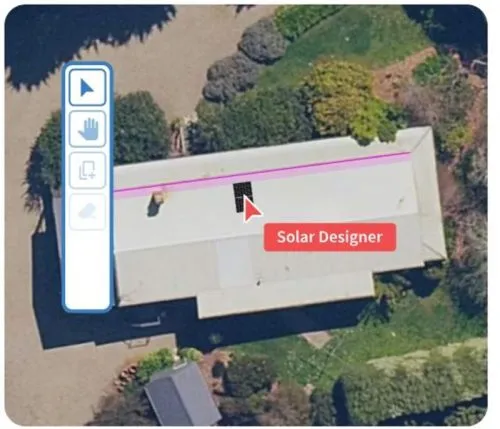
- Drop panels onto the roof with the drag-and-drop layout tool, tweaking tilt and azimuth as needed.
- Mark the shadow edges of trees, poles or nearby buildings on the image; Pylon works out their height from the sun’s angle, builds a 3D model of the site and estimates shading losses across the year.
- Add battery storage, EV charger, or heat pump profiles to model the full system.
- Let Pylon generate the SLD automatically once the design is locked, then export it for installation teams or grid connection applications.
- Generate a branded proposal from the design with production estimates and financial modeling built in.
- Attach Brighte or Smart Ease financing so clients can apply from within the proposal.
- Add a digital signature field and accept credit card payments for deposits or full amounts directly through the proposal.
- Share the proposal by link or email and track client engagement through the CRM.
FAQs
Does Pylon Solar require a monthly subscription?
No. Design and proposals are paid per project, $4 for Standard and $10 for Pro, with no minimum monthly spend. The only monthly charge is the optional CRM, from $49 per user per month.
Can I try Pylon Solar before buying?
Yes. New users get five free Standard project credits without entering a credit card, enough to design and quote a few real jobs before buying credits.
Does Pylon work for commercial solar projects?
For smaller commercial systems, yes. Standard projects are capped at 30 kW DC, so anything larger needs a $10 Pro project, and commercial bill input and peak-shaving analysis are still listed as coming soon. Pylon’s own comparison points businesses focused on large C&I and utility-scale work to HelioScope.
How many users can access one Pylon account?
Unlimited. There is no seat fee for design and proposals, so adding designers or sales staff does not raise the bill; only the optional CRM is charged per user.


