
What is PVcase?
PVcase is a solar engineering suite with a separate module for each project stage: PVcase Prospect for cloud-based site selection, Ground Mount for utility-scale layouts and Roof Mount for C&I rooftops (both run inside AutoCAD), and PVcase Yield for cloud energy modeling. Prospect is aimed at developers screening land; the design modules and Yield at EPC and engineering teams.
It is most useful on large ground-mount sites, where slope, row spacing and tracker placement change both the yield and the earthworks, and on C&I rooftops. It is not for residential installers or homeowners who need a quick proposal, and it is not a sales-proposal tool.
PVcase is for engineers laying out utility-scale and C&I PV plants, where terrain, row spacing and equipment choices decide the yield. It takes a site from land screening through a terrain-fitted layout with shading analysis to construction-ready CAD drawings and a yield estimate.
Pros and Cons
Pros
- Grading, piling and collision checks surface site problems at design stage, not during construction
- CAD teams work in their usual AutoCAD or Civil 3D drawings and export straight to PVsyst
- Electrical design, SLDs and BOMs come from the same layout, with no redrafting
- One vendor covers site screening, layout and P50/P90 yield, and you can license only the modules you need
Cons
- Not built for residential installers or quick sales proposals
- Ground Mount and Roof Mount need a separate AutoCAD license and CAD skills
- No public prices; quotes come after a sales demo, and the two-week trial is by request only
- Design modules run on Windows only, not on macOS or virtual machines
Features
Site Prospecting
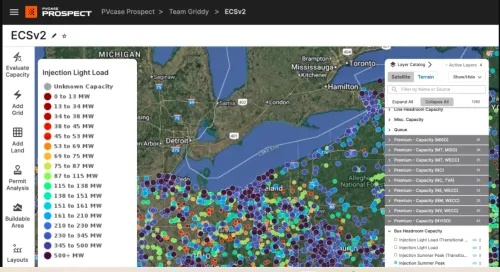
Prospect is for screening land before engineering starts. It began as the siting software of Anderson Optimization, the Boulder, Colorado company PVcase acquired in June 2023, so some US developers still know it by that name. It layers parcel ownership, flood risk, grid infrastructure and hosting-capacity maps for 40+ US utilities, and calculates each site's buildable area; higher plans add zoning, LMP and basis-risk data. The data is US-focused, so check coverage before using it in other markets.
Automated Layout Design
Ground Mount builds the layout from your placement rules (setbacks, spacing, offsets, orientation) and lets you optimize capacity and placement without redrawing the site. The same model carries stringing, preliminary and detailed electrical design, cable sizing with voltage-drop checks, and AC- or DC-coupled BESS.
Terrain-Based Optimization
On ground-mount sites, PVcase fits frames and trackers to the topography and checks them with slope, collision and piling analysis and cut-and-fill grading heatmaps.
Shading Analysis
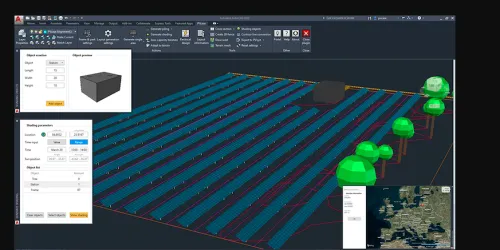
PVcase maps shading and irradiance across the layout, including shading from terrain and nearby objects, so engineers can fix loss hotspots before a full simulation.
CAD Integration
Ground Mount and Roof Mount run as plugins inside AutoCAD (versions 2019 to 2027) and AutoCAD-based products such as Civil 3D, so engineers build 3D layouts directly in their drawings. The AutoCAD license is bought separately, and the plugins need 64-bit Windows 10 or later: there is no macOS version, and they will not run on virtual machines.
Optimizing the Energy Yield
Inside Ground Mount, QuickYield gives a fast estimate for comparing tilt, spacing and configuration options. Detailed simulation runs in PVcase Yield: 3D ray tracing, bifacial and complex-terrain modeling, 15-minute intervals and P50/P90 scenarios. DC cabling losses and cell-string (mismatch) simulation need the Professional plan.
Project Collaboration
Yield imports Ground Mount layouts without rebuilding them, and Prospect keeps the company's site pipeline, reports and documents in one shared workspace.
Bankable Design Outputs
Ground Mount exports construction-ready layouts, single-line diagrams and bills of materials; Yield adds PDF reports and time-series data. These outputs support project approvals and financing.
PVcase Pricing
PVcase does not publish prices. Prospect, Ground Mount and Yield each have their own plan tiers, and every package is quoted by the sales team.
Pricing depends on the following:
Number of users
Plan tier (for example, Essentials, Professional or Premium in PVcase Prospect)
Required features and modules
Level of support and training
Quotes follow a demo, and a free two-week trial is available on request. If you plan to use Ground Mount or Roof Mount, budget for AutoCAD licenses on top of the PVcase subscription.
Integrations
- CAD software: besides AutoCAD, the design modules run in AutoCAD Electrical, Mechanical, MEP and Civil 3D; shapefile terrain must be prepared in Civil 3D first.
- GIS and terrain data: PVcase exchanges files with ArcGIS, QGIS and Google Earth Pro. Prospect imports KMZ files and shapefiles, and Ground Mount exports KML files for viewing in Google Earth.
- Energy simulation tools: finished layouts export to PVsyst (including the PVC 2.0 exchange format) and to PVcase Yield for detailed simulation.
How to Use PVcase
- Request a demo
Book a demo on the PVcase website and ask to see the module you need run on a site like yours.
- Consultation and onboarding
The PVcase team reviews your projects and recommends which modules and plan tiers fit.
- Account setup
PVcase sets up user accounts after onboarding.
- Install CAD environment
For Ground Mount or Roof Mount, install a supported AutoCAD version on a Windows PC (at least 12 GB of RAM and a 4 GB graphics card), then the PVcase plugin.
- Import project data
Create a project and load terrain, site boundaries and constraints.
- Configure design settings
Set the module, frame or tracker type, row spacing, tilt and electrical rules the layout should follow.
- Go live
Start designing and analyzing projects.
FAQs
What is PVcase used for?
PVcase is used to design solar plant layouts on real terrain. Engineers use it to place modules, define DC capacity, and prepare layouts for simulation and construction.
Who uses PVcase?
Utility-scale and C&I developers, EPC contractors and their design engineers. Named customers include AES, RWE, Iberdrola, Voltalia and ib vogt.
Does PVcase work with AutoCAD?
Yes. PVcase Ground Mount and Roof Mount run as plugins inside AutoCAD, so engineers design directly within CAD instead of switching tools. PVcase Prospect and PVcase Yield are cloud-based.
Does PVcase improve energy output?
Indirectly. Engineers compare spacing, tilt and terrain-fit options with QuickYield or PVcase Yield and keep the layout with the best simulated yield.


