
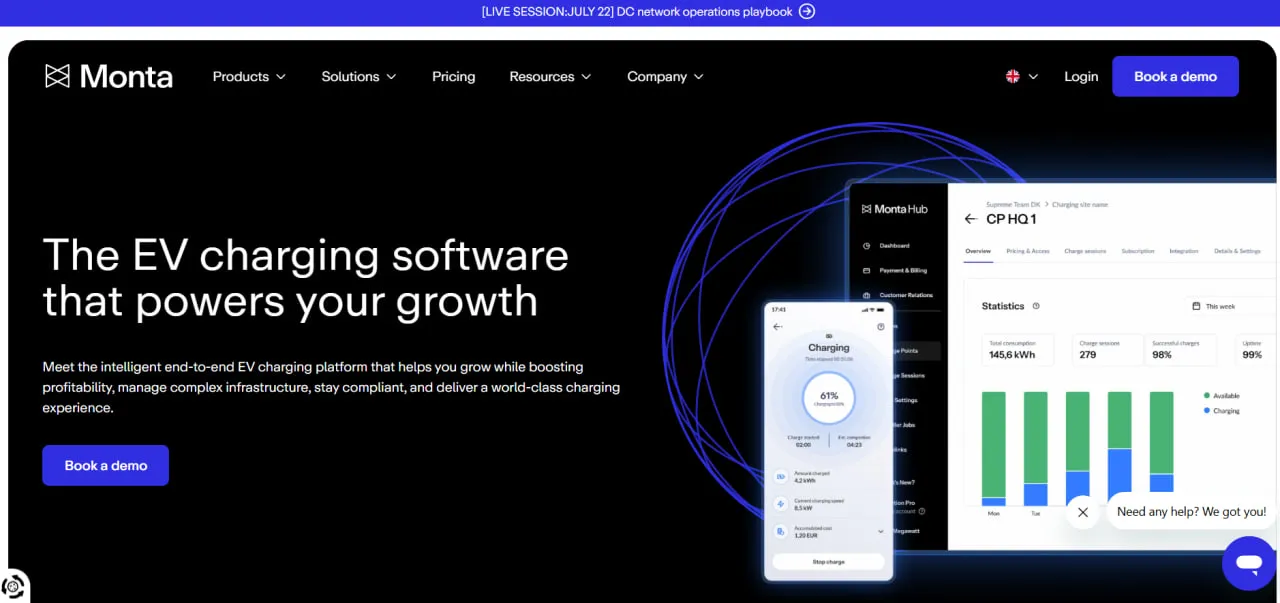
What Is Monta?
Monta is a cloud-based EV charge point management system (CPMS) sold as SaaS. Chargers connect to Monta over OCPP; operators run them from the Monta Hub web portal, with remote monitoring, pricing, automated billing and load management, while drivers find, start and pay for sessions in the Monta Charge app.
Its main strength is hardware support: Monta tests chargers in its own Copenhagen lab, which holds more than 100 AC models, so operators can mix manufacturers and are not locked into one. The company was founded in Copenhagen in 2020, raised an €80 million Series B in 2024 and entered the US market the same year. Its software won best EV app/software at the E-Mobility Awards 2023.
Monta is for companies that run EV chargers as a business or a service: charge point operators (CPOs), property managers, hotels, workplaces and company-car fleets. It puts chargers from different manufacturers on one platform, prices each session, collects payment from drivers and reimburses employees who charge company cars at home.
Pricing shows where it fits. In Europe the only published plan starts at 200 charge points, so a workplace with a handful of chargers has no listed entry option there; in the US, a Starter plan covers operators with up to 200 chargers. Monta sells software only, so the chargers themselves come from a separate supplier.
Pros and Cons
Pros
- Chargers from 260+ brands are supported, so you can buy hardware on price and availability and change supplier without changing software.
- Spot-linked tariffs pass hourly swings in electricity cost on to drivers instead of eroding the operator’s margin.
- Drivers get a free, well-rated app (Monta Charge: 4.6/5 from about 7,000 ratings on the UK App Store), so operators do not need a white-label app of their own.
- Automatic payments, invoicing, tax handling and monthly payouts take most billing work off the operator’s team.
- Proven at scale: Monta reports more than 350,000 active charge points and 65 million completed charging sessions on its platform.
- Load balancing lets a site add charge points without rewiring the building, and smart charging cuts peak-hour energy costs.
- ISO 27001 and SOC 2 Type II certifications make it easier to pass corporate IT security reviews.
Cons
- Setting up complex multi-site hierarchies takes time to learn.
- A 2–5% fee on every paid session adds up on busy public chargers.
- No published plan for small European sites: the only listed plan starts at 200 charge points and a platform fee from €500 a month.
- Some users report app problems after specific updates.
- Advanced features such as white-label apps, higher API limits, and premium SLAs are paid Advanced Plus add-ons.
- Customer support response times can vary depending on the subscription level.
Features
Hardware-Agnostic Connectivity
Lets operators mix charger brands in one network; when a migration or acquisition brings a model Monta does not support yet, Monta integrates and certifies it as part of the project.
Dynamic Pricing
Builds the charging price from the hourly spot price of electricity plus a fixed or percentage markup, with minimum and maximum caps, so margins hold when power prices spike.
Smart Charging
Shifts charging to the cheapest or lowest-CO2 hours using electricity prices, grid signals and renewable energy availability.
Automated Billing and Payments
Charges drivers, handles invoicing and tax, and settles each session in real time into the charge point owner’s digital wallet, which pays out to a bank account at the end of each month.
Fleet Management Tools
Reimburses home charging of company cars automatically after every session or at month end, splits billing between employer and employee, verifies the vehicle on each session and shows state of charge on one dashboard.
Real-Time Monitoring and Alerts
Displays the live status of every charger in the network and sends immediate notifications if a device goes offline or encounters a fault.
Public Roaming
Publishes chargers to roaming partners over OCPI, with 100+ direct integrations, so drivers using other apps can find and pay at them.
Self-Healing Algorithms
Sends an automatic OCPP hard reset to a charger stuck in Unavailable or Faulted status for an hour (at most once every six hours), which clears many software faults without a site visit. It works only on supported models connected over OCPP, not on stations reached through roaming.
Monta Pricing
Free Version: The Monta Charge app is free for EV drivers, both for home charging and for finding public stations.
Starter (US): For smaller operators with up to 200 managed chargers, Monta’s US site lists a $300 platform fee for the first year plus a 5% transaction fee.
Advanced: For networks of 200+ charge points, pricing is per socket: €5 per month per AC socket and €8 per month per DC socket in Europe, or $5 per Level 2 port and $10 per Level 3 (DC fast) port in the US.
Platform Fees: The Advanced plan adds a platform fee from €500 per month in Europe (from $250 per month in the US).
Transaction Fees: Monta takes a fee on paid charging sessions only, which covers Stripe payment processing: 2% on the European Advanced plan, 4% on the US Advanced plan, and 5% on the US Starter plan.
Advanced Plus: Large operators can buy add-on packages such as white-label apps, higher API rate limits (from €250 per 1,000 requests per 10 minutes), a Snowflake data warehouse, and premium SLAs, with volume discounts above 1,000 charge points.
Integrations
Monta connects over open protocols: OCPP 1.6J and 2.0.1 for chargers and OCPI for roaming.
- Hardware Integrations: Compatible with more than 900 charger models from over 260 brands, including ABB, Alfen, Wallbox, and Schneider Electric.
- Payment Integrations: Processes payments through Stripe and accepts major credit cards, Apple Pay, Google Pay and local payment methods, plus payment terminals from Payter and Nayax.
- Energy and Grid: Uses day-ahead spot prices from power exchanges such as Nord Pool to power its dynamic pricing features.
- Data and API: Offers a public API with webhooks for custom workflows and data pipelines; Snowflake data warehouse access is a paid Advanced Plus add-on.
- White Labeling: Runs Monta’s backend behind an operator’s own branded app and portal, for a setup fee plus monthly maintenance; Monta recommends this only for large operators with a well-known brand.
How to Set Up Monta
- Create a business account on the Monta Hub web portal or download the app for personal use.
- Ensure your charging hardware is installed and connected to the internet via Wi-Fi, Ethernet, or 4G, and configured to use Monta’s OCPP server (ocpp.monta.app).
- Add your charge points to the platform by entering the serial number or scanning the QR code on the device.
- Configure each site: private or public access rules and pricing schedules.
- Set up your payment details and digital wallet to enable automated billing and withdrawals.
- Invite team members and drivers to your organization.
How to Use Monta
A network manager typically starts the day in Monta Hub’s Map View, checking for offline chargers and open alerts, then pulls the previous day’s revenue and energy use by location from the reports. If a price spike is expected, they can change the smart charging settings to delay non-urgent sessions until prices drop.
Drivers find an available charger in the app, start the session and see charging speed and running cost live. When the session ends, the driver gets an automatic receipt, and the operator’s wallet is credited with taxes and fees already deducted.
What You Can Manage with Monta
- Charging Networks: Centralized control of multiple sites and hundreds of charging sockets.
- Pricing Models: Fixed, dynamic, or member-only pricing structures.
- Revenue Streams: Automated collection and distribution of payments from public drivers.
- Energy Load: Balancing power distribution to avoid overloading local grids or exceeding site limits.
- Analytics Reports: Charger utilization, CO2 savings and financial performance by site.
FAQs
What does Monta do?
Monta is EV charge point management software. Operators use it to monitor chargers, set prices, collect payments and balance site load; drivers use the free Monta Charge app to find, start and pay for charging sessions.
Who is Monta best for?
Businesses that run EV chargers: charge point operators, property managers, hotels, workplaces and company-car fleets. In Europe it suits networks of 200+ charge points, the threshold of the only published plan; in the US, smaller operators can start on the Starter plan.
Is Monta free?
The Monta Charge app is free for individual drivers to use at home or on the road. However, businesses and charge point operators pay a platform fee (plus monthly per-socket fees on the Advanced plan) and a transaction fee on paid charging sessions.
Does Monta support integrations?
Yes. Monta supports more than 900 charger models and offers a public API for business systems. It also integrates with payment processors like Stripe and energy market data providers like Nord Pool.
What are the main limitations of Monta?
Small European sites have no published entry plan: Advanced starts at 200 charge points with a platform fee from €500 a month. Transaction fees of 2–5% on paid sessions add up on busy public chargers, complex multi-site hierarchies take time to set up, and white-label apps, higher API limits and premium SLAs cost extra. Monta does not sell chargers, and its self-healing resets do not cover stations connected through roaming.
What are the best alternatives to Monta?
Common alternatives in the EV charging management space include ChargePoint, AMPECO, Virta, Wallbox (myWallbox), and Kempower ChargEye. ChargePoint, Wallbox and Kempower also make their own chargers, while Monta sells software only.


