
What is MATLAB/Simulink?
MATLAB is a programming language and computing environment used for numerical work—data, matrices, and calculations. It’s where engineers handle the math side of a solar energy problem. Simulink is used to model systems visually and run simulations over time. Components such as solar panels, inverters and storage are represented as blocks (from the Simscape Electrical add-on) and connected the way energy actually flows through the system.
In practice, it earns its place where behavior over time matters—how an inverter reacts to a voltage dip, how a battery covers a passing cloud—rather than a single output value such as annual yield.
MATLAB/Simulink keeps calculations, system models and simulations in one environment, so inputs aren’t moved between tools and rechecked with every design change. It suits power-electronics and controls engineers, grid-integration and R&D teams, and university researchers who build their own PV, inverter and storage models. It is not for energy-yield or bankability studies (P50/P90), PV layout or permit design: there is no PV yield database or layout tool, so teams pair it with dedicated PV design software.
Pros and Cons
Pros
- One environment for analysis and system models—no re-entering inputs between tools
- Working solar example models (Simscape Electrical) to start from
- Large ecosystem of add-ons (80+ in the trial alone)
- Control logic is tested in simulation before hardware exists
- Generates controller code from tested models
Cons
- PV work needs Simscape and Simscape Electrical, which double the Standard MATLAB + Simulink cost (US list)
- No energy-yield (P50/P90), layout or permit tools
- Requires time to learn properly
- Can feel heavy on system resources
- Licensing is complex: five license types, annual or perpetual, paid add-ons
Features
Energy Resources
Solar systems don’t operate under fixed conditions. Changing irradiance and temperature, and hybrid setups that combine solar with other sources, can be modeled as they vary over time. MathWorks’ examples include partial-shading analysis (Solar Plant block) and PV with battery backup.
Modeling and Simulation
For control systems and dynamic models, connecting PV arrays, inverters, storage and loads as blocks is faster than writing equations line by line. MathWorks’ examples—single- and three-phase grid-connected PV, a PV array with an MPPT boost converter—make good starting points.
Process Optimization
First-pass values for panel tilt, inverter sizing or storage levels rarely hold up. The model lets you test each change and rerun until results fall within the limits you set.
Chemicals and Materials
In long-term performance studies, material behavior—panel efficiency, degradation patterns—can be modeled under varying conditions. It is rarely where a project starts.
Utilities and Energy
For larger systems, the question becomes how the whole plant behaves on the network: load balancing, distribution and stability at high solar penetration. MathWorks’ examples include a PV plant with grid-forming battery storage (BESS).
Power and Control Systems
An inverter does more than convert DC to AC: its controls respond to voltage levels, frequency shifts and changing grid conditions. Those control behaviors can be modeled and tuned before anything is deployed.
Grid Analytics
Once solar is connected to the grid, its interactions with the network are harder to predict. Load flow, disturbances and fault scenarios can be studied in the model instead of on a live system.
Big Data and Image Analysis
Operating plants produce a steady stream of data from sensors, monitoring platforms and satellites. MATLAB can import, clean and analyze it alongside the models, so measured data can check or calibrate a simulation.
MATLAB and Simulink Pricing
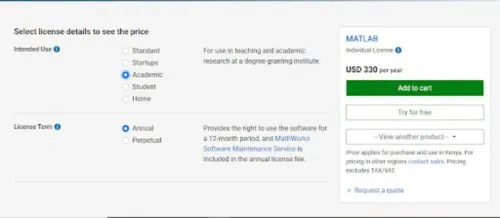
MathWorks prices licenses by intended use: Standard (commercial or government), Startup, Academic, Student and Home (personal use). Startup, Student and Home licenses are annual only. Standard and Academic licenses come either as an annual license with 12 months of updates and support, or as a perpetual license with the first year of maintenance included (US Standard list: $2,625 for MATLAB, $3,965 for Simulink).
Cost-wise, MATLAB list prices (as shown by MathWorks for buyers in Ukraine, excluding VAT; prices differ by region, for example the MATLAB and Simulink Student Suite is $119 per year in the US) range from:
$95 per year for home use (MATLAB and Simulink Home Suite),
$69 per year for students (MATLAB and Simulink Student Suite),
$330 per year for academic teaching and research (MATLAB only)
$4,235 per year for startups (MATLAB and Simulink Startup Suite with 90+ add-on products, for approved early-stage companies)
$1,050 per year for a standard commercial or government MATLAB license (MATLAB only)
PV, inverter and battery models also need Simulink, Simscape and Simscape Electrical. The Student and Home Suites include them; Standard and Academic buyers pay for each, which brings a Standard setup to $5,270 a year at US annual Standard list prices (MATLAB $1,050, Simulink $1,585, Simscape $1,050, Simscape Electrical $1,585). A 30-day trial includes MATLAB, Simulink and 80+ add-on products, and the basic version of MATLAB Online is free for up to 20 hours a month.
Integrations
MATLAB/Simulink handles the computation and simulation side and connects to the tools around it:
- Works with Python, C, and C++
- Connects to Arduino and Raspberry Pi, and to real-time targets for hardware-in-the-loop testing (Simulink Real-Time)
- Co-simulates with other simulation tools via FMI/FMU (Simulink FMU Builder) and interfaces with CAD tools
- Runs in a browser through MATLAB Online
- Imports data from files, databases (Database Toolbox) and industrial systems (Industrial Communication Toolbox)
How to Use MATLAB/Simulink

Most projects follow the same loop, whether the end result is a report or controller code:
- Define the problem
Is it data analysis, a control system, or a full system model? That decides whether you start in MATLAB or Simulink.
- Bring in your data
Import datasets or define the system parameters the analysis or simulation will run on.
- Build the logic or model
Use MATLAB scripts for calculations or Simulink blocks for system behavior.
- Run the simulation
Run the model under the conditions you want to test, such as an irradiance drop or a grid fault.
- Analyze results
Review plots, metrics or reports to spot performance trends and problems.
- Adjust and rerun
Change parameters or the model structure based on what the results show, then run it again.
- Export or deploy
Once the model behaves as expected, generate code or export results for implementation, reporting, or further development.
FAQs
Do I need programming knowledge to use MATLAB?
It helps, but you don’t need to be advanced. The syntax is consistent, and in Simulink much of the work is connecting blocks rather than writing code.
Is MATLAB required for solar projects?
Not always. It is used where simulation and validation are needed. If you’re working mostly with data or algorithms, MATLAB alone is enough. Simulink becomes useful when systems get more complex and need visual modeling.
Can it handle large-scale systems?
Yes. Utility-scale solar and grid studies are common use cases.
Is MATLAB beginner-friendly?
It can be, but there’s a learning phase. The tools make more sense once you apply them to actual problems instead of examples.
Where is MATLAB/Simulink mostly used?
Across engineering—aerospace, automotive, energy, robotics—and in university research. MathWorks reports 5 million+ users at 100,000+ organizations.
How reliable are the results?
Only as reliable as the input data and model setup. Check results against measured data or a reference case before basing design decisions on them.
Is it worth the cost?
If your work is control design, grid studies or custom system models, it’s widely used for a reason. If you mainly need yield estimates or layouts, it is more than you need.


