
What is Enerflo?
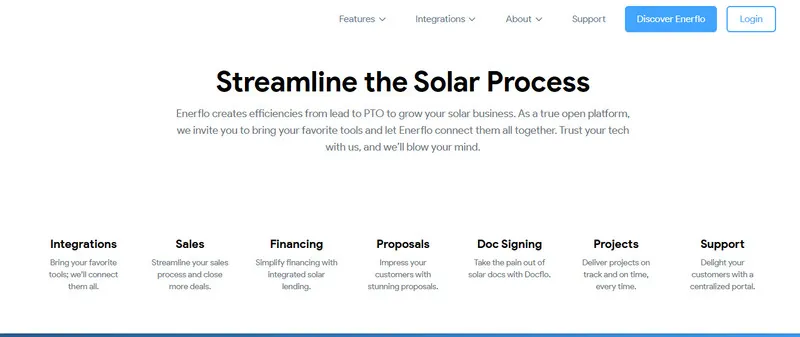
Enerflo describes itself as the operating system for residential solar. In practice it is a sales and operations platform that takes a deal from the first door knock through design, proposal, financing and contract to installation and Permission to Operate (PTO).
It has a built-in CRM but does not insist on being yours: a team already on another CRM can keep it and connect it, along with its design tool and lenders, using Enerflo as the system of record for solar projects.
When a residential solar company outgrows a generic CRM and spreadsheets, the bottleneck is rarely lead generation or closing. It is the handoffs: deal data retyped into the proposal, the lender portal, the contract and the install schedule. Enerflo keeps it all on one deal record. It is built for US sales dealers, installers and vertically integrated companies, not for utility-scale or larger commercial projects, and it is not available outside the US.
Pros and Cons
Pros
- Solar-specific steps built in, so less to configure than in a generic CRM
- One deal record from lead to PTO, with no retyping between sales and install
- Automated follow-ups and a shared pipeline make stalled deals visible
- Works with your existing CRM, design tool and lenders
- Flat monthly fee by volume, no per-seat or per-proposal charges
Cons
- No published prices; quote only after a discovery call
- One-time implementation fee and 12-month minimum contract
- US residential and light commercial only; not available outside the US
- Results depend on how well stages, templates and automations are configured
- Custom API work, complex CRM setups and integration monitoring cost extra
Features
Lead management
each pipeline record shows its stage, owner and latest activity. Title Checks confirm property details, and Smart Pulls, a soft credit check, flag the financing a homeowner is likely to qualify for.
Built-in proposals
the native Optimus builder uses the deal’s customer and pricing data and adds a savings forecast, battery sizing and loan, lease, PPA or cash options from integrated lenders.
Automation
follow-ups, task creation and stage changes can run automatically, so routine steps do not depend on each rep remembering them.
E-signatures
Docflo compiles the contract and all required documents into one signing packet, signed electronically without a separate e-sign tool.
Post-sale project tracking
after signing, the same record moves into Install Tracker, with configurable milestones for permits, inspections and utility approval through PTO, plus tasks and change orders. Homeowners follow progress in a white-labeled portal.
Mobile access
Enerflo runs in the browser, so reps can update a deal from a phone or tablet on site.
Enerflo Pricing
Enerflo does not publish prices; you get a quote after a discovery call. The fee is a flat monthly subscription, and the quote depends on:
Average monthly deal volume
Add-on features, advanced integrations and premium services (extra one-time or recurring fees)
Number of sales organizations and whether sales and install operations are combined (tiered pricing and volume discounts)
There are no per-seat, per-user, per-proposal or per-project charges, and core integrations are included, so the bill follows deal volume, not headcount. The fee also covers onboarding and training, dedicated account support and reporting. New partners pay a one-time implementation fee and sign a 12-month minimum contract; custom API work, complex CRM setups and optional integration monitoring cost extra.
Integrations
Enerflo says it connects to more than 150 tools. The main groups:
- Design tools: Aerialytic, Aurora, OpenSolar, Scanifly, PVWatts
- Lead generation and canvassing apps: SalesRabbit, Spotio, RepCard
- Financing: GoodLeap, Sunlight, Palmetto LightReach, Sungage, EnFin, Dividend, Everbright
- Communication tools: Twilio, SendGrid, Five9, Zoom, Google Calendar
CRMs such as Salesforce, HubSpot, Zoho and Pipedrive connect too; anything else goes through Zapier, the REST and GraphQL APIs or webhooks.
How to Use Enerflo
Enerflo’s team configures your instance during onboarding; your job is to decide how your team sells and which tools stay. The setup does not need to be perfect on day one.
Add your team
Set up users and roles, plus partner organizations if you work with outside dealers or installers.
Map your sales stages
Don’t copy someone else’s pipeline. Build it around how you actually sell.
Bring in your leads
Import existing leads, or connect the canvassing app or CRM that already feeds them.
Create a basic proposal template
Set up one branded template with your pricing and the lenders you offer; variations can come later.
Turn on a few automations
Start with follow-ups or status updates. You can refine later.
Start using it daily
Move live deals into Enerflo instead of running the old system in parallel, so gaps in the setup show up quickly.
Improve as you go
Use the reporting dashboards to see where deals actually stall, and adjust stages and automations to that, not to the plan.
FAQs
Is Enerflo difficult to learn?
No. There is a short adjustment period, but most teams get comfortable once they start working with real deals instead of test data.
Does Enerflo replace proposal tools completely?
For many teams, yes: proposals are built natively. System design comes from an integrated tool such as Aerialytic, Aurora or OpenSolar.
Is it only for large companies?
No. Smaller teams can use it, but the implementation fee and 12-month minimum contract weigh more on a company closing only a few deals a month.
Does it help with missed follow-ups?
Yes. Follow-ups and tasks can be automated, and stalled deals stand out because every record shows its owner and last activity.
Can reps use it while in the field?
Yes, from a phone or tablet browser. Reps can also present the proposal and collect the homeowner’s signature in person.
What makes it different from a regular CRM?
The solar steps are already built in: title checks, soft credit pulls, lender submissions, signing packets and install milestones through PTO. A generic CRM needs custom fields and workflows for each of them.
Does Enerflo support team collaboration?
Yes. Sales, operations and install staff share one deal record, and multi-organization setups let a sales dealer work with several installers on the same platform.


