
What Is EasySolar?
EasySolar is aimed at installers selling residential and small commercial rooftop PV, where a rep needs a layout, a price and a payback from little more than an address. Tariffs, incentives and metering rules come preconfigured for 15 markets, among them the US, Germany, Spain, Italy, France, Australia and Canada; elsewhere you set up the local scheme yourself. The interface runs in 25 languages, and the Lublin-based vendor reports more than 520,000 PV projects designed with it in 2025. It is not meant for bankable yield reports, detailed utility-scale engineering, or monitoring and O&M of operating plants.
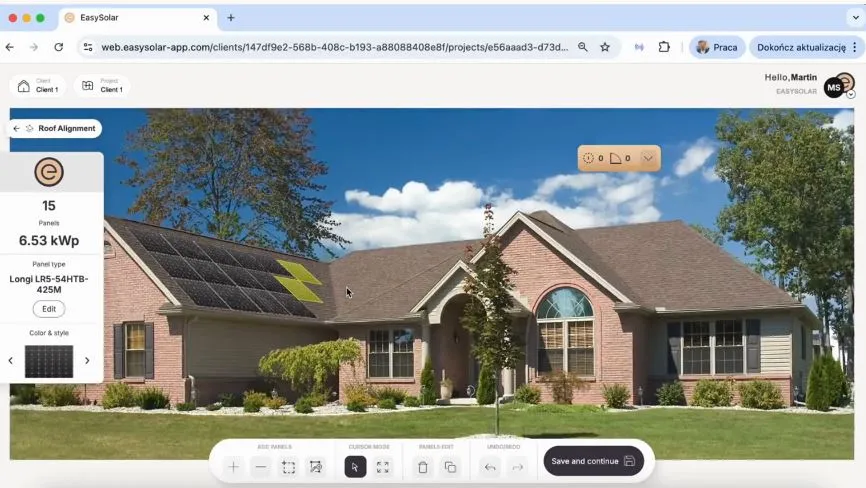
EasySolar is built around the sales visit rather than the engineering desk. From the client’s address it produces a roof layout, a quote from your own pricebook, a payback calculation under the local subsidy scheme and an interactive proposal the client can accept online, while the lead, meetings and deal sit in a built-in CRM. It runs in a phone or tablet browser, so a rep can finish the offer before leaving the site.
Pros and Cons
Pros
- Nothing to install: it runs in any browser, while tools such as PVsyst and PVcase need Windows (PVcase also needs an AutoCAD licence)
- Not stuck when aerial imagery is outdated or the building is new: switch to a ground photo, drone shot or roof plan within the same project
- Extra users cost $25/month and Business+ has no limits on projects or proposals, so cost grows with team size, not with the number of quotes
- Lead generator included in both plans, so web leads arrive already sized and priced instead of as bare contact forms
- After the client accepts online, the proposal link becomes a client panel with documents and project progress, so there is no separate customer portal to run
Cons
- The trial lasts only 3 days and needs a card, which is little time to load a pricebook and test it on real projects
- Yield comes from NASA satellite irradiance with no bankable simulation, so financed ground-mount and utility-scale projects still need PVsyst or a similar tool
Features
Automatic design from an address
the AI finds the roof on Google aerial imagery, reads each face’s pitch and azimuth, detects chimneys, dormers and shading, and fills the faces with modules from your pricebook
Design on your own images
a ground-level roof photo (modules drawn in perspective) or a drone shot, roof plan or map screenshot scaled from one known distance
- Solar farm tool for ground-mount and industrial sites from 100 kWp: pick the parcel and it lays out tables of one to six rows, south-facing or east-west, on national orthophotos (Poland, Spain, Germany, US) or Google imagery
- Electrical schematic designer for string configurations, voltage and current checks, and PDF export for the grid connection application
- Quoting from a shared company pricebook that holds your purchase and selling prices: modules come from the design, and the quote turns into an interactive branded proposal the client can accept online
- Financial analysis from the client’s energy bill under the local support scheme (subsidies, net metering), with loan financing and a cumulative cash-flow chart
- Built-in solar CRM for clients, deals and tasks, with a sales planner and per-rep statistics (kWp and net revenue, closed and open)
An AI lead generator for your website or a shared link
a prospect enters an address, gets a preliminary offer based on your pricing, and the lead lands in the CRM with roof data and system size
EasySolar Pricing
EasySolar has two plans. Prices below are from the English (USD) price list; local lists differ, for example €69/month plus €20 per extra user in Germany and 189 zł/month plus 59 zł per extra user in Poland.
Business+: $79/month including one user ($25/month per additional user). Covers all design and sales tools, CRM, API access and team management, with unlimited projects, proposals and end-customer access
Enterprise+: Custom pricing, starting at 50 users. Everything in Business+, plus proposals on your own templates, custom integrations, extended API limits and a dedicated onboarding manager
A 3-day free trial with full access is available; a card is required to start, but nothing is charged before the trial ends
Integrations
Business+ includes a REST API with API keys, but its scope is narrow: clients can be read and written and components created, while projects and the calendar are read-only, so projects cannot be pushed in from another system. Zapier and Make handle the rest, for example syncing the pricebook from Google Sheets or the planner with Google Calendar, and new leads can also go to Slack or Microsoft Teams. Enterprise+ adds extended API limits and custom integrations with warehouse and stock systems. Video tutorials, documentation and individual support come with both plans.
How to Set Up EasySolar
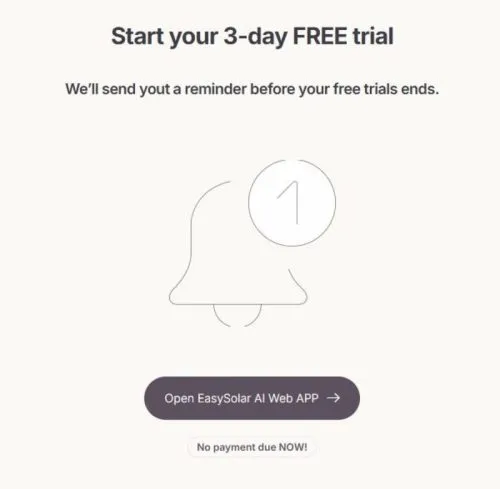
- Sign up at easysolar.app and start the free trial.
- Upload your company logo and configure branding for proposals.
- Build your pricebook with preferred modules, inverters, and batteries.
- Add team members and assign permission levels for admins, reps, and engineers.
- Connect existing tools via the API, Zapier or Make.
- Configure your AI lead generator page for client or rep-facing quoting.
How to Use EasySolar
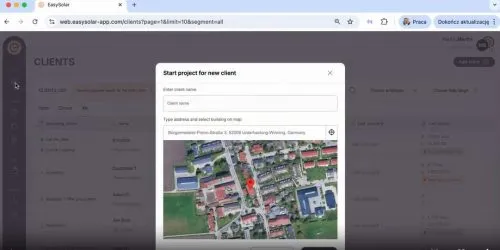
- Open a new project and enter the client’s address, drop a pin on Google Maps, or upload a roof or site photo.
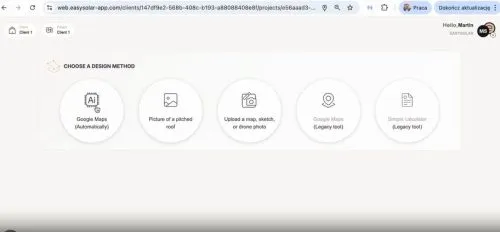
- Pick your design method: Google Maps auto-design, roof photo, drone image or your own map, or the solar farm tool for ground-mounted projects.
- With Google Maps auto-design, check the roof outline the AI detected and drag any vertex to the real edge if the imagery is out of date.
- Adjust panel placement using the drag, stretch, and trace tools.
- Open the schematic designer to set up strings and check electrical limits.
- Sync the layout to the pricing tool, add components from the pricebook, and build the quote.
- Run the financial analysis using the client’s energy bill and local subsidies; pricing and financials update as you go.
- Export the schematic as a PDF, then generate an interactive proposal and share it by link or email on the spot.
FAQs
Does EasySolar offer a free trial?
Yes. EasySolar offers a 3-day free trial with full access. A card is required to start, but nothing is charged before the trial ends.
Can clients generate their own solar quotes through EasySolar?
Yes. The AI lead generator lets clients or sales reps enter an address and get a preliminary design and offer based on your pricing, with your team notified by email straight away.
Is API integration available on all plans?
Yes. API integration is included as standard in Business+, together with Zapier and Make connectors. Enterprise+, which starts at 50 users, adds extended API limits, custom integrations and a dedicated onboarding manager.
Does EasySolar support electrical schematic design?
Yes. The built-in schematic designer covers string configurations, voltage and current checks, and both DC and AC sides, with PDF export for the grid connection application.


